 Cool享博客
简介:
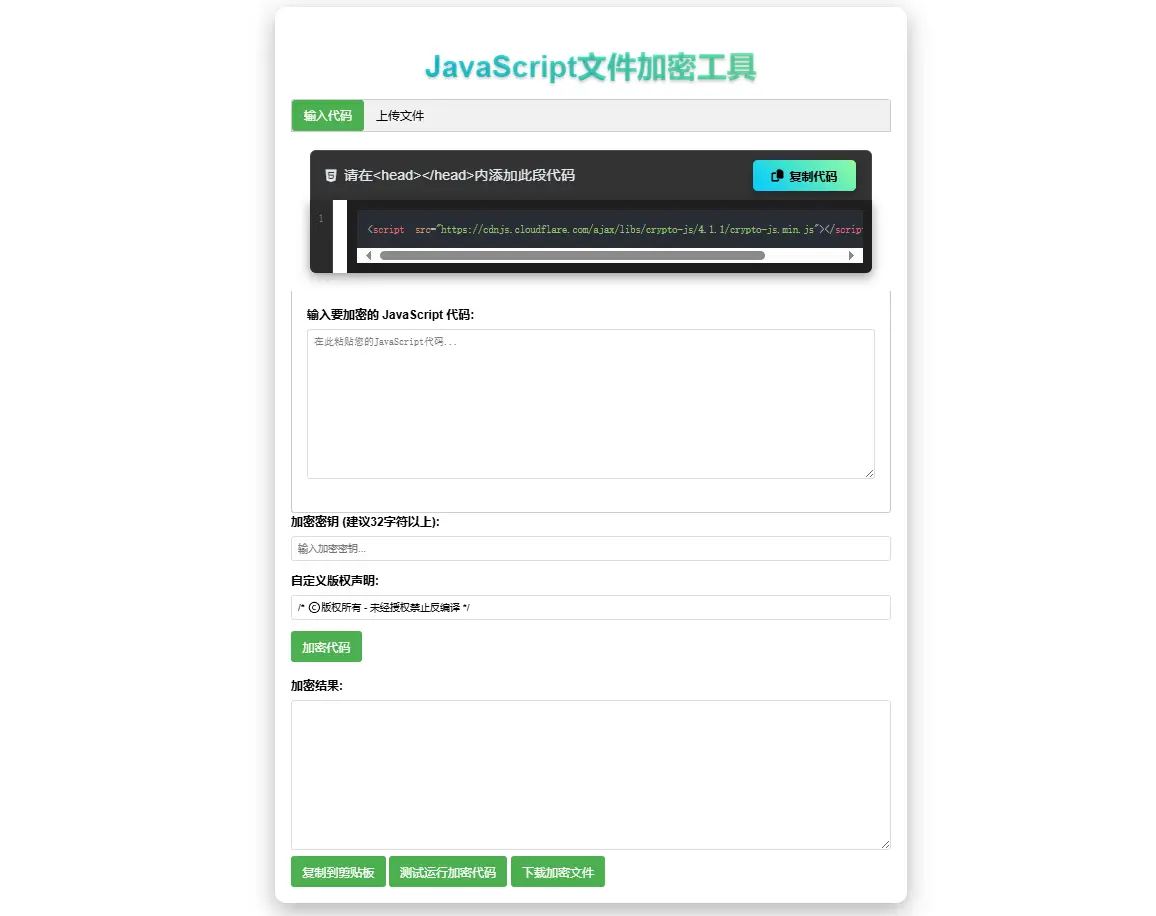
JavaScript代码在线加密工具源码
-支持代码部分和文件上传
-仅支持JS代码,其它代码加密后会运行出错
-可自定义版权提示
-自定义密钥
-支持加密后的代码以文件形式下载
<!DOCTYPE html>
<html lang="zh-CN">
<head>
<meta charset="UTF-8">
<meta name="viewport" content="width=device-width, initial-scale=1">
<meta name="description" content="JS文件加密工具,在线加密,保护您的代码安全!">
<meta property="og:title" content="JS文件加密 - 在线免费加密JS代码">
<meta property="og:description" content="JavaScript代码在线加密,安全便捷,在线保护您的代码安全!">
<link rel="shortcut icon" href="/favicon.ico" />
<title>JavaScript文件加密工具</title>
<script src="https://cdnjs.cloudflare.com/ajax/libs/crypto-js/4.1.1/crypto-js.min.js"></script>
<link rel="stylesheet" href="https://cdnjs.cloudflare.com/ajax/libs/highlight.js/11.7.0/styles/atom-one-dark.min.css">
<link rel="stylesheet" href="https://cdnjs.cloudflare.com/ajax/libs/font-awesome/6.4.0/css/all.min.css">
<style>
body {
font-family: Arial, sans-serif;
max-width: 800px;
margin: 0 auto;
padding: 20px;
line-height: 1.6;
}
.container {
background-color: #f5f5f5;
padding: 20px;
border-radius: 8px;
box-shadow: 0 2px 4px rgba(0,0,0,0.1);
}
h1 {
color: #333;
text-align: center;
}
.form-group {
margin-bottom: 15px;
}
label {
display: block;
margin-bottom: 5px;
font-weight: bold;
}
textarea, input[type="text"], input[type="file"] {
width: 100%;
padding: 8px;
border: 1px solid #ddd;
border-radius: 4px;
box-sizing: border-box;
}
textarea {
height: 200px;
font-family: monospace;
}
button {
background-color: #4CAF50;
color: white;
padding: 10px 15px;
border: none;
border-radius: 4px;
cursor: pointer;
font-size: 16px;
}
button:hover {
background-color: #45a049;
}
.tab {
overflow: hidden;
border: 1px solid #ccc;
background-color: #f1f1f1;
border-radius: 4px 4px 0 0;
}
.tab button {
background-color: inherit;
float: left;
border: none;
outline: none;
cursor: pointer;
padding: 10px 16px;
transition: 0.3s;
color: black;
}
.tab button:hover {
background-color: #ddd;
}
.tab button.active {
background-color: #4CAF50;
color: white;
}
.tabcontent {
display: none;
padding: 20px;
border: 1px solid #ccc;
border-top: none;
border-radius: 0 0 4px 4px;
background-color: white;
}
.result-area {
margin-top: 20px;
}
.file-info {
margin-top: 10px;
font-style: italic;
color: #666;
}
</style>
</head>
<body>
<div class="container">
<h1>JavaScript文件加密工具</h1>
<div class="tab">
<button class="tablinks active" onclick="openTab(event, 'inputTab')">输入代码</button>
<button class="tablinks" onclick="openTab(event, 'fileTab')">上传文件</button>
</div>
<!-- 开始 -->
<!-- <head>标签内,以下部分也属于
<link rel="stylesheet" href="https://cdnjs.cloudflare.com/ajax/libs/highlight.js/11.7.0/styles/atom-one-dark.min.css">
<link rel="stylesheet" href="https://cdnjs.cloudflare.com/ajax/libs/font-awesome/6.4.0/css/all.min.css">
-->
<style type="text/css">
.container {
width: 100%;
max-width: 1000px;
background: rgba(255, 255, 255, 0.1);
backdrop-filter: blur(10px);
border-radius: 15px;
box-shadow: 0 10px 30px rgba(0, 0, 0, 0.3);
overflow: hidden;
border: 1px solid rgba(255, 255, 255, 0.2);
}
header {
background: rgba(0, 0, 0, 0.7);
color: #fff;
padding: 20px;
text-align: center;
border-bottom: 1px solid rgba(255, 255, 255, 0.1);
}
h1 {
font-size: 2.5rem;
margin-bottom: 10px;
background: linear-gradient(to right, #00c9ff, #92fe9d);
-webkit-background-clip: text;
background-clip: text;
color: transparent;
text-shadow: 0 2px 4px rgba(0,0,0,0.2);
}
.subtitle {
color: #aaa;
font-size: 1.1rem;
max-width: 600px;
margin: 0 auto;
line-height: 1.6;
}
.features {
display: flex;
justify-content: center;
flex-wrap: wrap;
gap: 15px;
margin-top: 15px;
}
.feature {
background: rgba(0, 200, 255, 0.15);
padding: 8px 15px;
border-radius: 20px;
font-size: 0.9rem;
display: flex;
align-items: center;
gap: 8px;
}
.code-container {
padding: 25px;
position: relative;
}
.code-header {
display: flex;
justify-content: space-between;
align-items: center;
background: rgba(0, 0, 0, 0.8);
padding: 12px 20px;
border-radius: 8px 8px 0 0;
border: 1px solid rgba(255, 255, 255, 0.1);
border-bottom: none;
}
.code-title {
color: #e2e8f0;
font-size: 1.2rem;
display: flex;
align-items: center;
gap: 10px;
}
.copy-btn {
background: linear-gradient(45deg, #00c9ff, #92fe9d);
color: #000;
border: none;
padding: 10px 25px;
border-radius: 6px;
cursor: pointer;
font-weight: 600;
display: flex;
align-items: center;
gap: 8px;
transition: all 0.3s ease;
box-shadow: 0 4px 10px rgba(0, 0, 0, 0.3);
}
.copy-btn:hover {
transform: translateY(-2px);
box-shadow: 0 6px 15px rgba(0, 0, 0, 0.4);
}
.copy-btn:active {
transform: translateY(0);
}
.code-display {
position: relative;
border-radius: 0 0 8px 8px;
overflow: hidden;
box-shadow: 0 5px 15px rgba(0, 0, 0, 0.4);
}
pre {
margin: 0;
padding: 0;
}
.line-numbers {
position: absolute;
top: 0;
left: 0;
height: 100%;
background: #2b2b2b;
color: #7a7a7a;
text-align: right;
padding: 1em 0.8em;
border-right: 1px solid #444;
user-select: none;
font-family: monospace;
font-size: 14px;
line-height: 1.5;
}
.code-content {
margin-left: 50px;
overflow-x: auto;
background: #1e1e1e;
padding: 1em;
}
.code-content code {
font-family: 'Fira Code', monospace;
font-size: 14px;
}
.success-message {
position: fixed;
top: 20px;
right: 20px;
background: rgba(40, 167, 69, 0.9);
color: white;
padding: 15px 25px;
border-radius: 5px;
box-shadow: 0 5px 15px rgba(0,0,0,0.3);
transform: translateX(200%);
transition: transform 0.3s ease;
z-index: 1000;
}
.success-message.show {
transform: translateX(0);
}
.explanation {
background: rgba(255, 255, 255, 0.08);
border-radius: 10px;
padding: 25px;
margin: 25px;
color: #e2e8f0;
border: 1px solid rgba(255, 255, 255, 0.1);
}
.explanation h2 {
color: #00c9ff;
margin-bottom: 15px;
font-size: 1.8rem;
}
.explanation p {
line-height: 1.7;
margin-bottom: 15px;
font-size: 1.1rem;
}
.explanation ul {
padding-left: 25px;
margin: 15px 0;
}
.explanation li {
margin-bottom: 10px;
line-height: 1.6;
}
footer {
text-align: center;
padding: 20px;
color: rgba(255, 255, 255, 0.6);
font-size: 0.9rem;
border-top: 1px solid rgba(255, 255, 255, 0.1);
}
@media (max-width: 768px) {
.code-header {
flex-direction: column;
gap: 15px;
align-items: flex-start;
}
.copy-btn {
align-self: flex-end;
}
}
</style>
<div class="code-container">
<div class="code-header">
<div class="code-title">
<i class="fab fa-html5"></i> 请在<head></head>内添加此段代码
</div>
<button class="copy-btn" id="copyButton">
<i class="fas fa-copy"></i> 复制代码
</button>
</div>
<div class="code-display">
<div class="line-numbers">
1<br>2<br>3<br>4<br>5<br>6<br>7<br>8<br>9<br>10<br>11<br>12<br>13<br>14<br>15<br>16<br>17<br>18<br>19<br>20<br>21<br>22<br>23<br>24<br>25
</div>
<pre class="code-content"><code class="language-html"><script src="https://cdnjs.cloudflare.com/ajax/libs/crypto-js/4.1.1/crypto-js.min.js"></script> </code></pre>
</div>
</div>
<script src="https://cdnjs.cloudflare.com/ajax/libs/highlight.js/11.7.0/highlight.min.js"></script>
<script>
// 初始化语法高亮
hljs.highlightAll();
// 获取DOM元素
const copyButton = document.getElementById('copyButton');
const successMessage = document.getElementById('successMessage');
const codeContent = document.querySelector('.code-content');
// 复制功能实现
copyButton.addEventListener('click', async () => {
try {
// 获取代码文本(去除行号)
const codeText = codeContent.textContent;
// 使用Clipboard API复制文本
await navigator.clipboard.writeText(codeText);
// 显示成功消息
successMessage.classList.add('show');
// 3秒后隐藏消息
setTimeout(() => {
successMessage.classList.remove('show');
}, 3000);
} catch (err) {
console.error('复制失败:', err);
alert('复制失败,请手动复制代码');
}
});
// 自动生成行号
function generateLineNumbers() {
const lineNumbers = document.querySelector('.line-numbers');
const codeLines = codeContent.textContent.split('\n').length;
let numbersHtml = '';
for (let i = 1; i <= codeLines; i++) {
numbersHtml += `${i}<br>`;
}
lineNumbers.innerHTML = numbersHtml;
}
// 页面加载完成后生成行号
window.addEventListener('DOMContentLoaded', generateLineNumbers);
</script>
<!-- 结束 -->
<div id="inputTab" class="tabcontent" style="display: block;">
<div class="form-group">
<label for="jsCode">输入要加密的 JavaScript 代码:</label>
<textarea id="jsCode" placeholder="在此粘贴您的JavaScript代码..."></textarea>
</div>
</div>
<div id="fileTab" class="tabcontent">
<div class="form-group">
<label for="jsFile">选择 JavaScript 文件:</label>
<input type="file" id="jsFile" accept=".js">
<div id="fileInfo" class="file-info"></div>
</div>
</div>
<div class="form-group">
<label for="encryptionKey">加密密钥 (建议32字符以上):</label>
<input type="text" id="encryptionKey" placeholder="输入加密密钥...">
</div>
<div class="form-group">
<label for="copyrightNotice">自定义版权声明:</label>
<input type="text" id="copyrightNotice" placeholder="例如: /* 版权所有 ©️ 2025 */" value="/* ©️版权所有 - 未经授权禁止反编译 */">
</div>
<button onclick="encryptCode()">加密代码</button>
<div class="result-area">
<label for="encryptedResult">加密结果:</label>
<textarea id="encryptedResult" readonly></textarea>
<button onclick="copyToClipboard()">复制到剪贴板</button>
<button onclick="testEncryptedCode()">测试运行加密代码</button>
<button onclick="downloadEncryptedCode()">下载加密文件</button>
</div>
</div>
<script>
// 切换标签页
function openTab(evt, tabName) {
const tabcontent = document.getElementsByClassName("tabcontent");
for (let i = 0; i < tabcontent.length; i++) {
tabcontent[i].style.display = "none";
}
const tablinks = document.getElementsByClassName("tablinks");
for (let i = 0; i < tablinks.length; i++) {
tablinks[i].className = tablinks[i].className.replace(" active", "");
}
document.getElementById(tabName).style.display = "block";
evt.currentTarget.className += " active";
// 如果是文件标签页,设置文件上传事件
if (tabName === 'fileTab' && !document.getElementById('jsFile').hasAttribute('data-listener')) {
document.getElementById('jsFile').addEventListener('change', handleFileSelect, false);
document.getElementById('jsFile').setAttribute('data-listener', 'true');
}
}
// 处理文件选择
function handleFileSelect(event) {
const file = event.target.files[0];
if (!file) return;
const fileInfo = document.getElementById('fileInfo');
fileInfo.textContent = `已选择文件: ${file.name} (${(file.size / 1024).toFixed(2)} KB)`;
const reader = new FileReader();
reader.onload = function(e) {
document.getElementById('jsCode').value = e.target.result;
};
reader.readAsText(file);
}
// 高强度加密函数
function strongEncrypt(code, key, copyrightNotice) {
// 1. 生成随机盐值和初始化向量(增强安全性)
const salt = CryptoJS.lib.WordArray.random(128/8);
const iv = CryptoJS.lib.WordArray.random(128/8);
// 2. 使用PBKDF2派生密钥(增强密钥安全性)
const iterations = 10000;
const keySize = 256/32;
const derivedKey = CryptoJS.PBKDF2(key, salt, {
keySize: keySize,
iterations: iterations
});
// 3. AES-256-CBC加密
const encrypted = CryptoJS.AES.encrypt(code, derivedKey, {
iv: iv,
padding: CryptoJS.pad.Pkcs7,
mode: CryptoJS.mode.CBC
});
// 4. 构建加密数据对象
const encryptedData = {
ct: encrypted.ciphertext.toString(CryptoJS.enc.Base64),
iv: iv.toString(CryptoJS.enc.Hex),
salt: salt.toString(CryptoJS.enc.Hex),
iter: iterations
};
// 5. 添加HMAC校验(防篡改)
const hmacKey = CryptoJS.PBKDF2(key + "hmac", salt, {
keySize: keySize,
iterations: iterations
});
const hmac = CryptoJS.HmacSHA256(JSON.stringify(encryptedData), hmacKey);
encryptedData.hmac = hmac.toString(CryptoJS.enc.Hex);
// 6. 生成最终加密代码
const encryptedJson = JSON.stringify(encryptedData);
const base64Encoded = CryptoJS.enc.Utf8.parse(encryptedJson).toString(CryptoJS.enc.Base64);
// 7. 添加自定义版权声明
const finalCode = `${copyrightNotice}\n// ----- 加密内容开始 -----\n` +
`(function(){try{var _0x=${JSON.stringify(base64Encoded)};` +
`var _1x=JSON.parse(CryptoJS.enc.Base64.parse(_0x).toString(CryptoJS.enc.Utf8));` +
`var _2x=CryptoJS.PBKDF2(${JSON.stringify(key)},CryptoJS.enc.Hex.parse(_1x.salt),{keySize:8,iterations:_1x.iter});` +
`var _3x=CryptoJS.PBKDF2(${JSON.stringify(key)}+'hmac',CryptoJS.enc.Hex.parse(_1x.salt),{keySize:8,iterations:_1x.iter});` +
`var _4x=CryptoJS.HmacSHA256(JSON.stringify({ct:_1x.ct,iv:_1x.iv,salt:_1x.salt,iter:_1x.iter}),_3x).toString(CryptoJS.enc.Hex);` +
`if(_4x!==_1x.hmac)throw new Error('完整性校验失败');` +
`var _5x=CryptoJS.AES.decrypt(_1x.ct,_2x,{iv:CryptoJS.enc.Hex.parse(_1x.iv),padding:CryptoJS.pad.Pkcs7,mode:CryptoJS.mode.CBC});` +
`return eval(_5x.toString(CryptoJS.enc.Utf8));}catch(e){console.error('解密失败:',e);return null;}})();`;
return finalCode;
}
// 加密代码
function encryptCode() {
const jsCode = document.getElementById('jsCode').value;
const encryptionKey = document.getElementById('encryptionKey').value;
const copyrightNotice = document.getElementById('copyrightNotice').value;
if (!jsCode) {
alert('请输入要加密的JavaScript代码或上传文件');
return;
}
if (!encryptionKey) {
alert('请输入加密密钥');
return;
}
if (encryptionKey.length < 16) {
if (!confirm('警告: 加密密钥较短(建议32字符以上),是否继续?')) {
return;
}
}
try {
const encryptedCode = strongEncrypt(jsCode, encryptionKey, copyrightNotice);
document.getElementById('encryptedResult').value = encryptedCode;
} catch (e) {
alert('加密过程中出错: ' + e.message);
console.error(e);
}
}
// 复制到剪贴板
function copyToClipboard() {
const resultTextarea = document.getElementById('encryptedResult');
if (!resultTextarea.value) {
alert('没有可复制的内容');
return;
}
resultTextarea.select();
document.execCommand('copy');
// 显示临时提示
const originalText = resultTextarea.placeholder;
resultTextarea.placeholder = '已复制到剪贴板!';
setTimeout(() => {
resultTextarea.placeholder = originalText;
}, 2000);
}
// 测试运行加密代码
function testEncryptedCode() {
const encryptedCode = document.getElementById('encryptedResult').value;
if (!encryptedCode) {
alert('没有可测试的加密代码');
return;
}
try {
console.log('----- 开始测试加密代码 -----');
eval(encryptedCode);
console.log('----- 加密代码测试完成 -----');
alert('加密代码运行成功,请查看控制台输出');
} catch (e) {
console.error('加密代码运行错误:', e);
alert('加密代码运行出错: ' + e.message);
}
}
// 下载加密文件
function downloadEncryptedCode() {
const encryptedCode = document.getElementById('encryptedResult').value;
if (!encryptedCode) {
alert('没有可下载的加密代码');
return;
}
let filename = 'encrypted.js';
const fileInput = document.getElementById('jsFile');
if (fileInput.files.length > 0) {
const originalName = fileInput.files[0].name;
filename = originalName.replace('.js', '') + '_encrypted.js';
}
const blob = new Blob([encryptedCode], { type: 'application/javascript' });
const url = URL.createObjectURL(blob);
const a = document.createElement('a');
a.href = url;
a.download = filename;
document.body.appendChild(a);
a.click();
setTimeout(() => {
document.body.removeChild(a);
URL.revokeObjectURL(url);
}, 100);
}
</script>
</body>
</html>