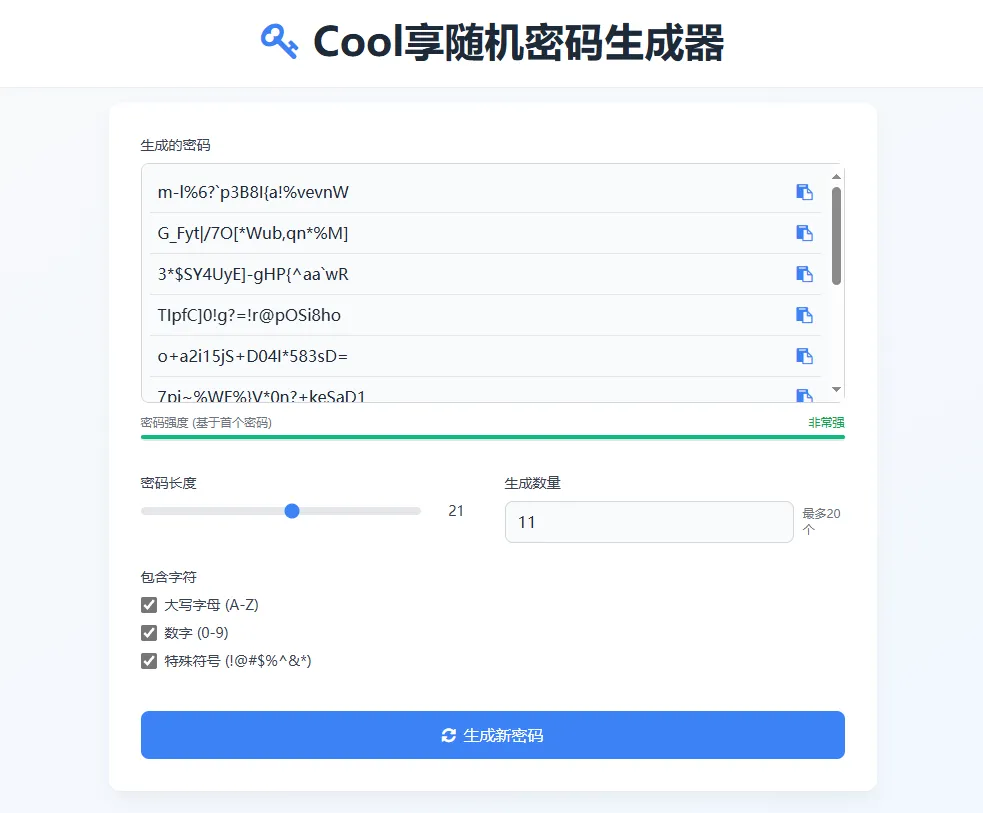
- 代码完全开源,并且只有 HTML 、PHP和 JavaScript,容易修改。
- 所有计算操作都在本地进行,不会向服务器发送消息。
- 可以自由选择是否使用标点以及是否区分字母大小写。
- 自带密码复杂度检测
<?php
// 密码生成函数
function generatePassword($length = 12, $includeUpper = true, $includeNumbers = true, $includeSymbols = true) {
$lowercase = 'abcdefghijklmnopqrstuvwxyz';
$uppercase = 'ABCDEFGHIJKLMNOPQRSTUVWXYZ';
$numbers = '0123456789';
$symbols = '!@#$%^&*()_+~`|}{[]:;?><,./-=';
// 初始化字符集
$charset = $lowercase;
if ($includeUpper) $charset .= $uppercase;
if ($includeNumbers) $charset .= $numbers;
if ($includeSymbols) $charset .= $symbols;
$password = '';
$charsetLength = strlen($charset);
// 确保生成的密码长度至少为1
if ($length < 1) $length = 1;
// 生成随机密码
for ($i = 0; $i < $length; $i++) {
$password .= $charset[random_int(0, $charsetLength - 1)];
}
return $password;
}
// 处理表单提交
$generatedPasswords = [];
if ($_SERVER["REQUEST_METHOD"] == "POST") {
$length = isset($_POST['length']) ? (int)$_POST['length'] : 12;
$includeUpper = isset($_POST['includeUpper']);
$includeNumbers = isset($_POST['includeNumbers']);
$includeSymbols = isset($_POST['includeSymbols']);
$count = isset($_POST['count']) ? min(max((int)$_POST['count'], 1), 20) : 1; // 限制生成数量在1-20之间
for ($i = 0; $i < $count; $i++) {
$generatedPasswords[] = generatePassword($length, $includeUpper, $includeNumbers, $includeSymbols);
}
}
?>
<!DOCTYPE html>
<html lang="zh-CN">
<head>
<meta charset="UTF-8">
<meta name="viewport" content="width=device-width, initial-scale=1.0">
<title>随机密码生成器</title>
<script src="https://cdn.tailwindcss.com"></script>
<link href="https://cdn.jsdelivr.net/npm/[email protected]/css/font-awesome.min.css" rel="stylesheet">
<script>
tailwind.config = {
theme: {
extend: {
colors: {
primary: '#3B82F6',
secondary: '#64748B',
success: '#10B981',
danger: '#EF4444',
},
fontFamily: {
sans: ['Inter', 'system-ui', 'sans-serif'],
},
}
}
}
</script>
<style type="text/tailwindcss">
@layer utilities {
.content-auto {
content-visibility: auto;
}
.password-strength-bar {
height: 4px;
transition: width 0.3s ease;
}
.card-shadow {
box-shadow: 0 10px 25px -5px rgba(0, 0, 0, 0.05), 0 8px 10px -6px rgba(0, 0, 0, 0.02);
}
.password-item {
transition: all 0.2s ease;
}
.password-item:hover {
transform: translateX(4px);
}
}
</style>
</head>
<body class="bg-gradient-to-br from-gray-50 to-blue-50 min-h-screen flex flex-col">
<header class="bg-white shadow-sm py-4">
<div class="container mx-auto px-4">
<h1 class="text-[clamp(1.5rem,3vw,2.5rem)] font-bold text-gray-800 flex items-center justify-center">
<i class="fa fa-key text-primary mr-3"></i>
随机密码生成器
</h1>
</div>
</header>
<main class="flex-grow flex items-center justify-center p-4">
<div class="container mx-auto max-w-3xl">
<div class="bg-white rounded-xl p-6 md:p-8 card-shadow">
<form id="passwordGeneratorForm" method="post" action="" class="space-y-6">
<div class="mb-8">
<label class="block text-sm font-medium text-gray-700 mb-2">生成的密码</label>
<div class="relative">
<div class="bg-gray-50 border border-gray-300 rounded-lg p-2 max-h-60 overflow-y-auto" id="passwordsContainer">
<?php if (!empty($generatedPasswords)): ?>
<?php foreach ($generatedPasswords as $index => $password): ?>
<div class="password-item flex items-center justify-between p-2 border-b border-gray-200 last:border-b-0">
<span class="text-gray-800 break-all"><?php echo htmlspecialchars($password); ?></span>
<button type="button" class="copy-password-btn text-primary hover:text-primary/80 transition-colors" data-password="<?php echo htmlspecialchars($password); ?>">
<i class="fa fa-clipboard"></i>
</button>
</div>
<?php endforeach; ?>
<?php else: ?>
<div class="text-gray-500 italic text-center py-4">点击"生成新密码"按钮开始生成</div>
<?php endif; ?>
</div>
</div>
<div id="copyNotification" class="mt-2 text-sm text-success hidden">
<i class="fa fa-check-circle"></i> 已复制到剪贴板
</div>
<!-- 密码强度指示器 -->
<div class="mt-3">
<div class="flex items-center justify-between mb-1">
<span class="text-xs text-gray-500">密码强度 (基于首个密码)</span>
<span id="strengthText" class="text-xs font-medium">未生成密码</span>
</div>
<div class="w-full bg-gray-200 rounded-full h-1.5">
<div id="strengthBar" class="password-strength-bar bg-danger rounded-full h-1.5 w-0"></div>
</div>
</div>
</div>
<div class="grid grid-cols-1 md:grid-cols-2 gap-6">
<div>
<label for="length" class="block text-sm font-medium text-gray-700 mb-2">密码长度</label>
<div class="flex items-center">
<input
type="range"
id="length"
name="length"
min="8"
max="32"
step="1"
value="<?php echo isset($_POST['length']) ? (int)$_POST['length'] : 12; ?>"
class="w-full h-2 bg-gray-200 rounded-lg appearance-none cursor-pointer accent-primary"
>
<span id="lengthValue" class="ml-3 min-w-[3rem] text-center text-sm font-medium text-gray-700">
<?php echo isset($_POST['length']) ? (int)$_POST['length'] : 12; ?>
</span>
</div>
</div>
<div>
<label for="count" class="block text-sm font-medium text-gray-700 mb-2">生成数量</label>
<div class="flex items-center">
<input
type="number"
id="count"
name="count"
min="1"
max="20"
value="<?php echo isset($_POST['count']) ? (int)$_POST['count'] : 1; ?>"
class="w-full px-3 py-2 bg-gray-50 border border-gray-300 rounded-lg focus:ring-2 focus:ring-primary/50 focus:border-primary transition-all outline-none text-gray-800"
>
<span class="ml-2 text-xs text-gray-500">最多20个</span>
</div>
</div>
</div>
<div class="grid grid-cols-1 md:grid-cols-2 gap-6">
<div>
<label class="block text-sm font-medium text-gray-700 mb-2">包含字符</label>
<div class="space-y-2">
<label class="flex items-center">
<input
type="checkbox"
id="includeUpper"
name="includeUpper"
<?php echo isset($_POST['includeUpper']) ? 'checked' : 'checked'; ?>
class="w-4 h-4 text-primary focus:ring-primary/50 border-gray-300 rounded"
>
<span class="ml-2 text-sm text-gray-700">大写字母 (A-Z)</span>
</label>
<label class="flex items-center">
<input
type="checkbox"
id="includeNumbers"
name="includeNumbers"
<?php echo isset($_POST['includeNumbers']) ? 'checked' : 'checked'; ?>
class="w-4 h-4 text-primary focus:ring-primary/50 border-gray-300 rounded"
>
<span class="ml-2 text-sm text-gray-700">数字 (0-9)</span>
</label>
<label class="flex items-center">
<input
type="checkbox"
id="includeSymbols"
name="includeSymbols"
<?php echo isset($_POST['includeSymbols']) ? 'checked' : 'checked'; ?>
class="w-4 h-4 text-primary focus:ring-primary/50 border-gray-300 rounded"
>
<span class="ml-2 text-sm text-gray-700">特殊符号 (!@#$%^&*)</span>
</label>
</div>
</div>
</div>
<div class="pt-4">
<button
type="submit"
class="w-full bg-primary hover:bg-primary/90 text-white font-medium py-3 px-4 rounded-lg transition-all duration-300 transform hover:scale-[1.02] focus:outline-none focus:ring-2 focus:ring-primary/50 focus:ring-offset-2 flex items-center justify-center"
>
<i class="fa fa-refresh mr-2"></i>
生成新密码
</button>
</div>
</form>
</div>
<div class="mt-8 bg-white rounded-xl p-6 card-shadow">
<h2 class="text-xl font-semibold text-gray-800 mb-4 flex items-center">
<i class="fa fa-info-circle text-primary mr-2"></i>
为什么需要强密码?
</h2>
<ul class="space-y-2 text-gray-600">
<li class="flex items-start">
<i class="fa fa-check-circle text-success mt-1 mr-2"></i>
<span>强密码可以有效保护你的账户安全,降低被破解的风险</span>
</li>
<li class="flex items-start">
<i class="fa fa-check-circle text-success mt-1 mr-2"></i>
<span>建议定期更换重要账户的密码,并使用不同的密码</span>
</li>
<li class="flex items-start">
<i class="fa fa-check-circle text-success mt-1 mr-2"></i>
<span>不要在多个网站使用相同的密码,避免"一密泄露,全军覆没"</span>
</li>
</ul>
</div>
</div>
</main>
<footer class="bg-gray-800 text-white py-6 mt-8">
<div class="container mx-auto px-4">
<div class="text-center text-sm text-gray-400">
<p>© 2025 随机密码生成器 | 保护你的数字安全</p>
</div>
</div>
</footer>
<script>
// 密码长度滑块交互
const lengthSlider = document.getElementById('length');
const lengthValue = document.getElementById('lengthValue');
lengthSlider.addEventListener('input', function() {
lengthValue.textContent = this.value;
});
// 复制到剪贴板功能
const copyNotification = document.getElementById('copyNotification');
// 为所有复制按钮添加事件监听
document.addEventListener('click', function(e) {
if (e.target.closest('.copy-password-btn')) {
const btn = e.target.closest('.copy-password-btn');
const password = btn.getAttribute('data-password');
navigator.clipboard.writeText(password).then(function() {
// 显示复制成功通知
copyNotification.classList.remove('hidden');
setTimeout(() => {
copyNotification.classList.add('hidden');
}, 2000);
});
}
});
// 密码强度检测
function checkPasswordStrength(password) {
let strength = 0;
let strengthText = '';
let strengthColor = '';
// 基本长度检查
if (password.length >= 12) {
strength += 25;
} else if (password.length >= 8) {
strength += 15;
}
// 检查包含的字符类型
const hasUpper = /[A-Z]/.test(password);
const hasLower = /[a-z]/.test(password);
const hasNumber = /[0-9]/.test(password);
const hasSymbol = /[^A-Za-z0-9]/.test(password);
const charTypeCount = [hasUpper, hasLower, hasNumber, hasSymbol].filter(Boolean).length;
strength += charTypeCount * 15;
// 密码熵估计 (简化版)
const charPoolSize = (() => {
let size = 0;
if (hasLower) size += 26;
if (hasUpper) size += 26;
if (hasNumber) size += 10;
if (hasSymbol) size += 32; // 近似特殊符号数量
return size;
})();
// 基于字符集和长度的熵估计
const entropy = password.length * Math.log2(charPoolSize);
if (entropy > 70) strength += 20;
else if (entropy > 50) strength += 10;
// 强度文本和颜色
if (strength >= 90) {
strengthText = '非常强';
strengthColor = 'bg-success';
} else if (strength >= 70) {
strengthText = '强';
strengthColor = 'bg-green-500';
} else if (strength >= 50) {
strengthText = '中等';
strengthColor = 'bg-yellow-500';
} else if (strength >= 30) {
strengthText = '弱';
strengthColor = 'bg-orange-500';
} else {
strengthText = '非常弱';
strengthColor = 'bg-danger';
}
return {
score: Math.min(strength, 100),
text: strengthText,
color: strengthColor
};
}
// 实时更新密码强度指示器
function updatePasswordStrength() {
const passwordContainer = document.getElementById('passwordsContainer');
const firstPasswordElement = passwordContainer.querySelector('.password-item span');
const strengthBar = document.getElementById('strengthBar');
const strengthText = document.getElementById('strengthText');
if (!firstPasswordElement) {
strengthBar.style.width = '0%';
strengthBar.className = 'password-strength-bar bg-danger rounded-full h-1.5 w-0';
strengthText.textContent = '未生成密码';
return;
}
const password = firstPasswordElement.textContent;
const strength = checkPasswordStrength(password);
strengthBar.style.width = `${strength.score}%`;
// 移除所有颜色类,然后添加新的颜色类
strengthBar.className = strengthBar.className.replace(/bg-\w+(-\d+)?/g, '');
strengthBar.classList.add(strength.color);
strengthText.textContent = strength.text;
strengthText.className = `text-xs font-medium ${strength.color === 'bg-success' ? 'text-green-600' :
strength.color === 'bg-green-500' ? 'text-green-600' :
strength.color === 'bg-yellow-500' ? 'text-yellow-600' :
strength.color === 'bg-orange-500' ? 'text-orange-600' : 'text-red-600'}`;
}
// 初始检查密码强度
document.addEventListener('DOMContentLoaded', function() {
updatePasswordStrength();
});
// 表单提交时添加动画效果
const form = document.getElementById('passwordGeneratorForm');
form.addEventListener('submit', function() {
const submitBtn = this.querySelector('button[type="submit"]');
const originalText = submitBtn.innerHTML;
// 禁用按钮并显示加载状态
submitBtn.disabled = true;
submitBtn.innerHTML = '<i class="fa fa-circle-o-notch fa-spin mr-2"></i> 生成中...';
// 防止多次提交
setTimeout(() => {
submitBtn.disabled = false;
submitBtn.innerHTML = originalText;
}, 1000);
});
</script>
</body>
</html>
 Cool享博客